Part 0 of a series on building an enterprise-grade Security Operations Center at home — from open-source foundations and custom tooling.
Most "home lab" security projects end the same way: you install Security Onion, watch the dashboard light up with alerts for a week, feel like you've built something real, and then never look at it again. The alerts pile up. The noise buries the signal. Nothing gets tuned. Eventually the VM gets powered off to reclaim the RAM.
I wanted the opposite of that. I wanted a Security Operations Center that actually operates — one that runs 24/7, triages its own alerts, tells me only when something matters, and keeps working when I'm not looking at it. In other words, I wanted to build the thing enterprises pay six figures a year for, on a home network, and understand every layer well enough to have built it myself.
This series is how I did it.
This isn't just a tutorial lab
I want to be precise about the claim, because a home SOC can be a lot of things. What I built is different from a follow-the-steps install in a few specific ways:
- It runs continuously and monitors itself. A SOC that silently dies is worse than no SOC,
because it gives you false confidence. Mine has a dead-man's-switch that alerts me if the monitoring itself stops. (More on that later — and yes, it's caught real outages.)
- It triages in tiers, not floods. Raw intrusion-detection output on a normal home network is
~99% noise. The system automatically dismisses the noise, files the "worth-a-glance" items for later, and pings me in real time only for the genuinely serious. I'm hands-off unless something is actually wrong.
- It has an AI analyst I wrote from scratch — not a wrapper around a cloud API, but a custom
triage engine combining deterministic security logic with a locally-run language model. The SOC's data never leaves my network. (This is the part I'm most proud of, and it gets its own posts.)
- It closes the loop to remediation — not just "here are 5,000 vulnerabilities," but "here are
the three things actively being exploited in the wild that you should patch first."
This isn't just a lab — it's a purpose-built architecture. And the point of this series is to get security engineers, security architects, and home-SOC builders thinking outside the box: to build better defenses, contribute to a stronger security community, and raise the bar for what a self-built system can do. My hardware for this setup is admittedly a bit overkill — but the series is scaled down so you can do a real version of this at home.
The 30,000-foot view
Here's the whole system in one diagram:
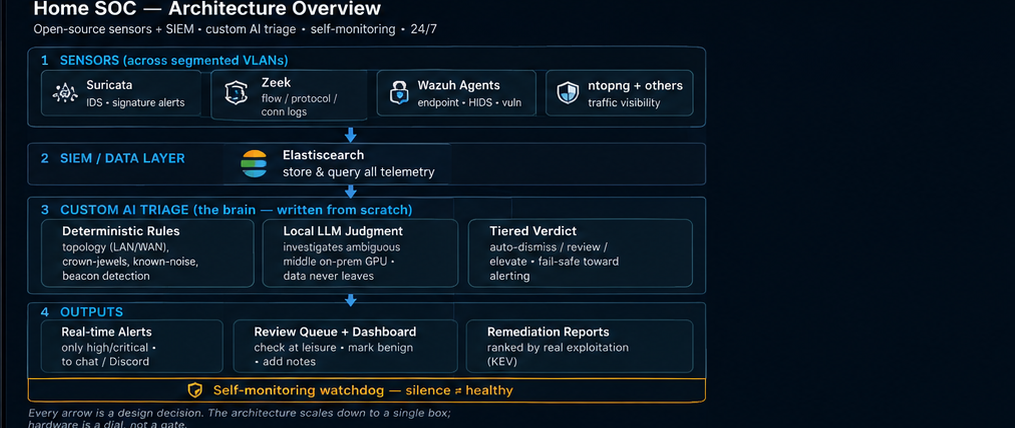
Every arrow in that diagram is a design decision, and over the next several posts I'll walk through each one: why Zeek and Suricata, why the AI layer is deterministic-first, how beacon detection actually works, why remediation should be ranked by real-world exploitation instead of raw severity scores, and how the system watches itself.
"But I don't have a data center in my basement"
Neither do most people, and you don't need one. My setup is robust — multiple virtualization hosts, dedicated GPUs, a segmented network with a pentest range bolted on — because I also use it for other work. That's overkill for getting started, and I don't want my hardware to gatekeep the idea.
The architecture scales down. The concepts in this series — tiered triage, topology-aware detection, risk-based remediation — work on a single mini-PC with 16GB of RAM. Later in the series I'll lay out three honest tiers: the "single box, start here" floor, the "comfortable home SOC" sweet spot (a used GPU changes everything for the AI layer), and my full reference build. Hardware is a dial, not a gate.
If you've followed one of the excellent home-lab build series out there — the kind that walk you through standing up a virtual network, a firewall, a range, and a SIEM — this series picks up where those leave off. Those teach you to build the lab. This one is about making it operate: turning a pile of security tools into a system that triages itself and only bothers you when it matters.
Why bother?
Three reasons, and they're probably yours too if you're reading this:
- You learn a field by building its systems, not by reading about them. Standing up detection,
watching it fail, tuning it, and operating it taught me more about security operations than any course. When something breaks at 2am — and it will — you learn how it actually works.
- It's a portfolio you can't fake. A running system with a custom AI analyst, real detection
engineering, and documented war stories says more than any resume bullet. This series is that portfolio, in public.
- It's the capability behind the work I do. I run a cybersecurity company,
ByTE X Bit Technologies LLC; this is the kind of architecture and tooling that work is built on. Showing it beats claiming it.
What's next
Over the coming posts, we'll build this up layer by layer:
- The foundation — the open-source stack (Wazuh, Zeek, Suricata, ntopng, Elastic, and a few
others) on a segmented home network, and why each one earns its place.
- The signal-to-noise problem — why raw alerts are unusable, and the tiered-triage idea that
fixes it.
- Building the AI analyst — the custom triage engine, and why running the LLM locally matters.
- Hunting C2 — catching malware beacons with statistics and Zeek flow data.
- Actionable alerts — LLM enrichment and getting notified only when it counts.
- Risk-based remediation — prioritizing what's actually being exploited (CISA KEV).
- Who watches the watcher — self-monitoring, and the real failures I found running this thing.
If you've ever wanted to see what "enterprise-grade" actually means under the hood — and build a real version of it yourself — follow along.
Next up: [The Foundation — Wazuh, Zeek, Suricata & Elastic on a Home Network].
I'm Bryant, founder of ByTE X Bit Technologies LLC, a Maryland-based cybersecurity company. I build and operate the kind of detection, triage, and remediation systems this series walks through. If your organization needs help with security monitoring, detection engineering, or hardening — get in touch.
Comments
Comments are reviewed before they appear — thanks for your patience.